Home › Business Apps › Travel Request & Approval
Ready-made Power Apps app
Travel Request and Approval App for Power Apps
Employees request business trips with hotel and rental car details, managers approve them in Outlook or Teams, and a PDF record is created before anyone books.

Real screen from the app (demo data)
The short answer
What is the Travel Request app?
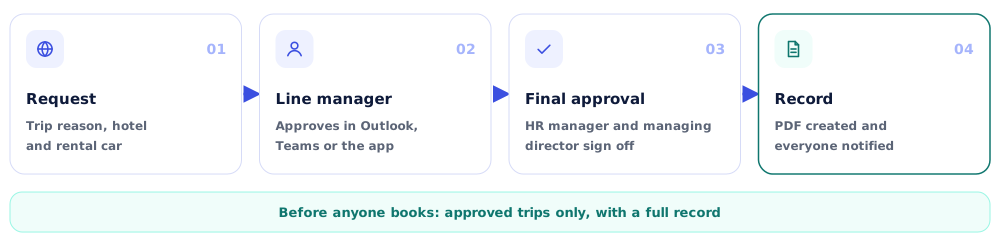
It's a ready-made Power Apps app that takes a trip from request to approval. Employees add the reason, hotel and rental car needs, approvers act from Outlook or Teams, and the final approval creates a PDF record. You buy it once, and we tailor the approval chain to your company.
After the trip, the Expense Claim app handles reimbursement.
The problem it solves
From scattered requests to one clear process
Without the app
- Trip approvals buried in email threads
- Bookings made before anyone approves
- Hotel and car details scattered
- No record when finance asks later
With the Travel Request & Approval app
- One request with every trip detail
- Approvals before booking, in Outlook or Teams
- Status visible to the traveler
- A PDF record after final approval
How it works
How a request moves through the app
Who uses it
Built for every role in the process
Employees
Submit trip requests with reason, hotel and rental car details, and filter their own requests.
Approvers
Line managers, HR managers and the managing director approve or reject from Outlook, Teams or the app.
Admins
Manage company name, logo, address and colors, and see every request on the dashboard.
Features
What the Travel Request & Approval app does
Requests
- Travel reason and type
- Hotel accommodation details
- Rental car requests
- Requests on behalf of others
Approvals
- Line manager, HR manager and managing director steps
- Approve from Outlook, Teams or the app
- Comments from each approver
- Notifications to everyone involved
Records
- Dashboard: total, pending, approved, rejected
- All Travel Requests screen with filters
- PDF created after final approval
- Branding in admin settings