Home › Apps › Power BI Development
Power BI services
Power BI Development and Consulting Services
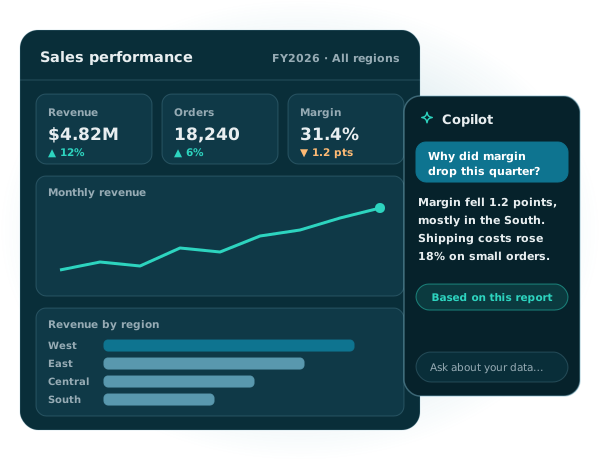
We build Power BI reports and dashboards your leaders trust: one source of truth, fast to load, secure by role and ready for Copilot. Shown where your people already work, in Teams, SharePoint and Power Apps.
Illustrative example
The short answer
What do Power BI development services include?
Power BI development services cover connecting your data, building semantic models with the right measures and security, designing reports and dashboards, and publishing them where people work. A good partner also gets licensing right, sets up governance and keeps reports fast and accurate as your data grows.
Our services
Power BI services, end to end
Consulting and planning
KPIs, data sources, licenses and a roadmap, agreed before anything is built.
Dashboard and report design
Clean, focused reports that answer real questions on desktop and mobile.
Data modeling and DAX
Semantic models with trusted measures, so every report uses the same numbers.
Data integration
Connections to SQL Server, ERP, CRM, Excel, SharePoint, Dataverse and cloud apps.
Embedding
Reports inside SharePoint, Teams, Power Apps or your own customer portal.
Copilot readiness
Models and capacity set up so Copilot in Power BI gives useful answers.
Security and governance
Row-level security, workspaces, sensitivity labels and Microsoft Purview.
Migration
Tableau, Excel and SSRS reports rebuilt in Power BI.
Training and support
Training for report users and authors, plus ongoing fixes and improvements.
How it fits together
One semantic model, many ways to use it
The heart of a good Power BI solution is the semantic model: one trusted set of tables, relationships, measures and security that every report uses. Build it once and it powers dashboards, Copilot and agents.
Where Microsoft Fabric comes in
Power BI is part of Microsoft Fabric, but you don’t need to adopt all of Fabric to use it. Fabric capacity matters when you want Copilot, free viewers on larger capacities, or Direct Lake, a storage mode that reads large volumes of data in Fabric without importing copies.
Why one model beats many
When every department builds its own copy of the data, numbers stop matching and refreshes multiply. We build shared semantic models that teams reuse, so “revenue” means the same thing in every report.
AI in Power BI
Copilot in Power BI and Fabric data agents
AI can now summarize reports, answer questions and draft visuals. It only works well on a clean, well-described model, and it needs the right capacity. We set up both.
Copilot in Power BI
The Copilot pane in reports is generally available. It summarizes pages, answers questions about the data and helps authors build visuals. Some newer experiences, like the standalone Power BI agent, are still in preview.
Fabric data agents
Data agents answer plain-language questions over your semantic models, and they work with Microsoft Copilot and Copilot Studio. They’re generally available and respect row-level security.
What Copilot needs
Copilot requires paid Fabric capacity (F2 or higher) or Power BI Premium (P1 or higher) in a supported region. A Pro or Premium Per User license alone isn’t enough.
How we prepare your model
Clear table and measure names, descriptions, synonyms and tidy relationships, so Copilot and agents understand your business terms.
Licensing explained
Which Power BI license do you need?
The right license depends on who creates reports, who views them and which features you need. We check this during planning so there are no surprises.
| Option | What it gives you | Good fit when |
|---|---|---|
| Free | Personal use, and viewing content on a large Fabric capacity | Viewers in organizations with F64 or larger |
| Power BI Pro | Publish, share and collaborate on reports | Most report authors and smaller teams |
| Premium Per User | Pro features plus larger models and advanced features | Teams that need premium features without a capacity |
| Fabric capacity (F SKUs) | Shared capacity for Copilot, Direct Lake, data agents and embedding | Larger organizations and AI scenarios |
Free viewers need F64 or larger
On F64 or larger, users with a free license can view Power BI content. On smaller capacities, every viewer needs Pro, Premium Per User or a trial.
Moving off Premium P SKUs
Microsoft is retiring Power BI Premium per-capacity SKUs and no longer sells new ones. We plan and run the move to Fabric capacity before your subscription ends, so reports keep running.
Reports where people work
Power BI in SharePoint, Teams and Power Apps
People use reports more when they don’t have to go looking for them. Because we build on Microsoft 365 every day, we put reports right where decisions happen.
Each option has its limits. SharePoint embeds keep row-level security but don’t support guest users, and Microsoft recommends no more than three Power BI tiles at once in a canvas app. We design around these from the start.
Migration and modernization
Moving reports to Power BI, and keeping them current
We rebuild reports from other tools in Power BI and move away from Power BI features Microsoft is retiring. Q&A experiences go away in February 2027, datamarts are no longer supported, and streaming semantic models are being replaced by Real-Time Intelligence in Fabric.
Dashboards we build
Power BI dashboards for every department
Finance
Revenue, margin, budget versus actual and cash flow, refreshed automatically from your ERP.
Sales
Pipeline, win rates and forecasts from Dynamics 365 or your CRM, by region and rep.
Operations
Orders, inventory, delivery times and service levels in one daily view.
HR
Headcount, hiring, turnover and leave trends, with row-level security for sensitive data.
IT service
Ticket volumes, resolution times and backlog from your help desk or SharePoint lists.
Projects
Status, budgets and milestones across projects, pulled from Planner, Project or Dataverse.
Our standards
Reports that stay accurate and fast
Every Power BI solution we deliver passes the same checklist. Shared models keep numbers consistent, row-level security keeps data private, and version control means changes are tracked and reversible.
We save reports as Power BI projects, release them through deployment pipelines and use Microsoft Purview sensitivity labels, so sensitive data stays protected even when it’s exported.
How we deliver
From raw data to dashboards people use
Discover
Questions, KPIs, data sources and licenses.
Model
Semantic model, measures and security.
Design
Report prototypes reviewed with users.
Validate
Numbers checked against your source systems.
Launch
Pipelines to production, training and support.
Ways to work with us
Choose how you want to work with us
Fixed-scope project
A dashboard set, a migration or a semantic model, with milestones and training.
Discuss your project →Dedicated Power BI developer
A developer who joins your team full time or part time, matched in one to two weeks.
Hire a Power BI developer →Why TSinfo
Why teams choose us for Power BI
Free consultation
Talk to a Power BI expert
Planning new dashboards, fixing slow reports or moving off P SKUs? In 30 minutes, we’ll review your setup and suggest a clear next step.
Book a Free Consultation- A quick review of your reports and data
- Licensing and capacity advice
- Copilot readiness check
- A recommended first step
FAQ
Power BI development questions
What does a Power BI consultant do?
A Power BI consultant connects your data, builds semantic models and measures, designs reports, sets up security and licensing, and trains your team. The goal is reports people trust and actually use.
How long does a Power BI dashboard project take?
It depends on the number of data sources, how clean the data is and how many reports you need. A focused dashboard on one or two sources can take a few weeks. We share a timeline after discovery.
Which Power BI license do we need?
Most authors need Power BI Pro. Premium Per User adds larger models and advanced features. Fabric capacity is needed for Copilot, Direct Lake and data agents, and on F64 or larger, free users can view content. Microsoft lists the options in its Power BI license guide.
Can you migrate Tableau, Excel or SSRS reports to Power BI?
Yes. We rebuild Tableau dashboards as Power BI reports, turn emailed Excel reports into shared models with subscriptions, and move SSRS reports to paginated reports in Power BI.
Can you embed Power BI in SharePoint, Teams or Power Apps?
Yes. We add reports to SharePoint pages, Teams channels and canvas apps, and design around each option’s limits, such as guest access in SharePoint and the number of tiles in a canvas app.
How do you keep our data secure?
We use row-level security so people see only their data, organize workspaces by audience and apply Microsoft Purview sensitivity labels. Security is tested for every role before launch.
Related services
Keep exploring
Ready for reports your team trusts?
Tell us what you need to measure. We’ll suggest the fastest path to dashboards people use.