Home › Automation › Business Process Automation
Business process automation
Business Process Automation Services
We automate the approvals, requests and paperwork that slow your team down, using Microsoft 365 tools you may already own.
Illustrative example
The short answer
What is business process automation?
Business process automation uses software to move routine work forward on its own: routing approvals, copying data between systems, sending reminders and filing documents. People still make the decisions, but they stop chasing emails and retyping information.
Robotic process automation (RPA) is one part of it. RPA mimics clicks and typing in older desktop apps that have no API. Most business processes need both: cloud workflows for modern apps, and RPA for the systems that can’t connect any other way.
Processes we automate
The everyday work we take off your team’s plate
Each of these starts as a slow, manual process. Here’s what changes once it’s automated.
Approvals
Before: requests stuck in inboxes.
After: routed to the right approver with reminders and a full history.
Onboarding and offboarding
Before: HR emails IT and facilities one by one.
After: every team gets its tasks the moment HR adds a hire.
Invoice processing
Before: invoices typed in by hand.
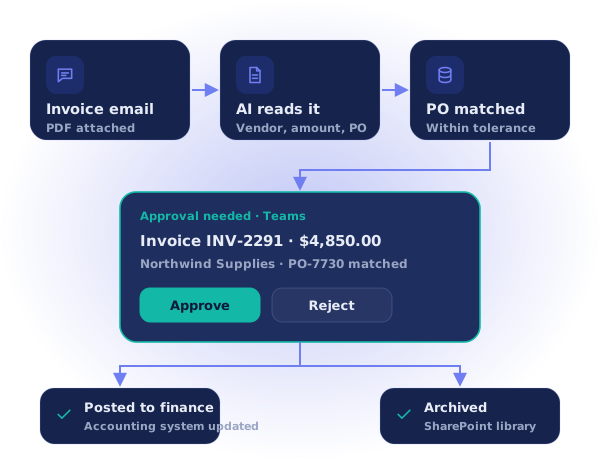
After: AI reads each invoice, matches the PO and sends it for approval.
Purchase requests
Before: spreadsheets and email chains.
After: one form, budget checks and multi-step approvals.
Document review
Before: attachments and conflicting versions.
After: reviewers assigned in SharePoint with due dates and one final version.
IT and facilities requests
Before: calls and chats with no tracking.
After: tickets created, assigned and updated automatically.
Reports and notifications
Before: someone compiles a weekly update.
After: reports and alerts arrive on schedule in Teams or email.
Tasks in older apps
Before: copying data into legacy systems.
After: RPA enters the data for you, with no API needed.