Home › Intranet & Documents › Document Management
Document management services
SharePoint Document Management Services
We turn scattered folders, file shares and email attachments into a SharePoint document management system people trust: easy to find, safe to share, kept for the right length of time and ready for Microsoft Copilot.
Illustrative example
The short answer
What is SharePoint document management?
SharePoint document management uses SharePoint Online libraries to store, organize, find, share and retain your company’s documents. With the right metadata, permissions, retention labels and automation, it replaces file shares and many standalone document management systems, using the Microsoft 365 you already have.
What we set up
Document management services, end to end
Information architecture
Sites, libraries and content types designed around how your teams actually work.
Metadata and taxonomy
Columns and managed terms that make documents easy to filter, sort and find.
AI document processing
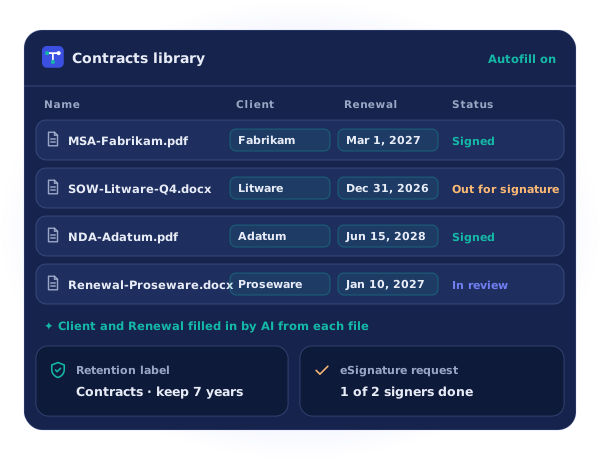
AI that reads files and fills in metadata, so people stop typing it by hand.
Retention and records
Microsoft Purview labels that keep records as long as required, and no longer.
Permissions and sharing
Simple permission groups, sensitivity labels and sharing rules that protect confidential files.
Migration
File shares, Google Drive, Box, Dropbox and Egnyte moved to SharePoint Online.
Metadata vs folders
Stop hunting through folders
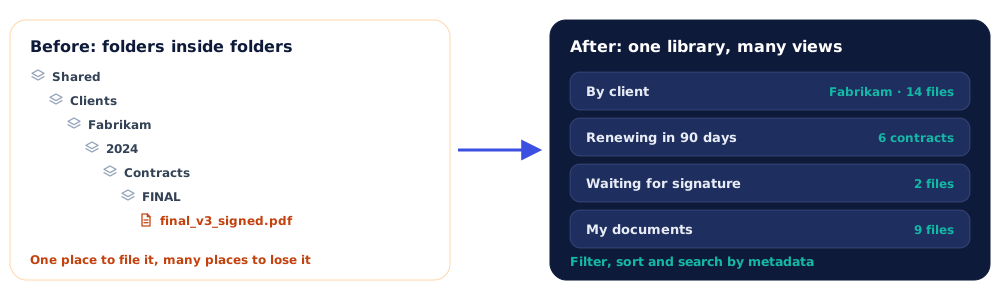
Folders force every file into one place. Metadata lets the same document show up wherever people look for it: by client, by date, by status or by owner.
Why metadata works better
With consistent columns and managed terms, people filter a library in seconds, search returns better results and views like “Renewing in 90 days” update themselves. It also makes automation and AI far more accurate.
Designed around SharePoint limits
A library can hold up to 30 million files, but views and queries work best under the 5,000-item list view threshold, and file paths can’t exceed 400 characters. We design libraries, indexes and views with these limits in mind.
AI that files documents for you