IT Help Desk Application Built on Power Apps
A ready-to-deploy IT Help Desk application for Microsoft 365 organizations. Employees submit tickets via a clean Power Apps interface, automated workflows route and escalate them via Power Automate, and all data is stored and tracked in SharePoint — fully customizable, no licensing fees beyond M365.
🏢 Built for Microsoft 365 Teams | ⚡ No External Tools Required | 🔒 Data Stays in Your Tenant | ✅ Works with Existing M365 License
Still Managing IT Support With Email & Spreadsheets?
Every day, IT teams lose hours chasing requests buried in inboxes, updating Excel trackers manually, and switching between tools that were never built for helpdesk work.
Expensive platforms like ServiceNow or Jira are overkill for most internal teams — and they pull your data outside your organization’s control.
There’s a better way — one that lives entirely inside Microsoft 365, uses tools you already own, and deploys in hours, not months.
THE OLD WAY VS. THE BETTER WAY
❌ Email threads as ticket tracking
❌ Manual Excel status updates
❌ Costly SaaS tools with external data
✅ Structured tickets with auto-generated IDs
✅ Real-time dashboards inside Microsoft 365
✅ 100% in your tenant — zero extra license cost
Everything Your IT Team Needs — Already Inside Microsoft 365
8 reasons IT teams choose to build their helpdesk on the Microsoft Power Platform instead of buying yet another SaaS tool.
Deployment
No New Tools. No New Licenses.
Built entirely on Power Apps, Power Automate, and SharePoint — platforms your organization already pays for and governs.
Data Security
Your Data Never Leaves Your Tenant.
All ticket data lives in your SharePoint lists, inside your Microsoft 365 environment. No third-party servers. No compliance risk.
Automation
Tickets Move Themselves Forward.
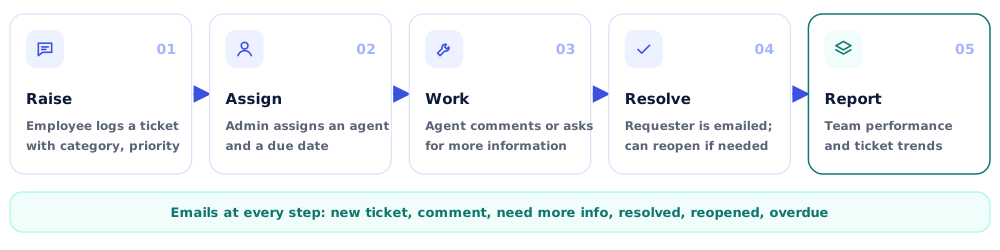
Power Automate handles notifications, assignments, and escalations automatically — your team focuses on resolving, not chasing.
Role-Based Access
Everyone Sees Exactly What They Need.
Admins, Support Agents, and End Users each get a purpose-built experience — no clutter, no confusion, no accidental access.
Visibility
Real-Time Dashboards for Every Role.
From individual ticket history to team-wide performance reports — every stakeholder has the visibility they need, when they need it.
Customization
Make It Yours in Minutes.
Update your logo, company name, ticket ID prefix, screen headers, and support hours — all from inside the app, no code needed.
Self-Service
Users Help Themselves First.
A built-in, searchable FAQ library reduces repeat tickets by giving employees instant answers before they ever submit a request.
Accountability
Every Ticket Has an Owner and a Deadline.
Due dates are mandatory on assignment. Team performance is tracked by agent, time range, and resolution rate — nothing slips through.
9 Powerful Screens. One Seamless Experience.
Every screen is purpose-built for a specific role — so admins, support agents, and end users each get exactly what they need, nothing more.
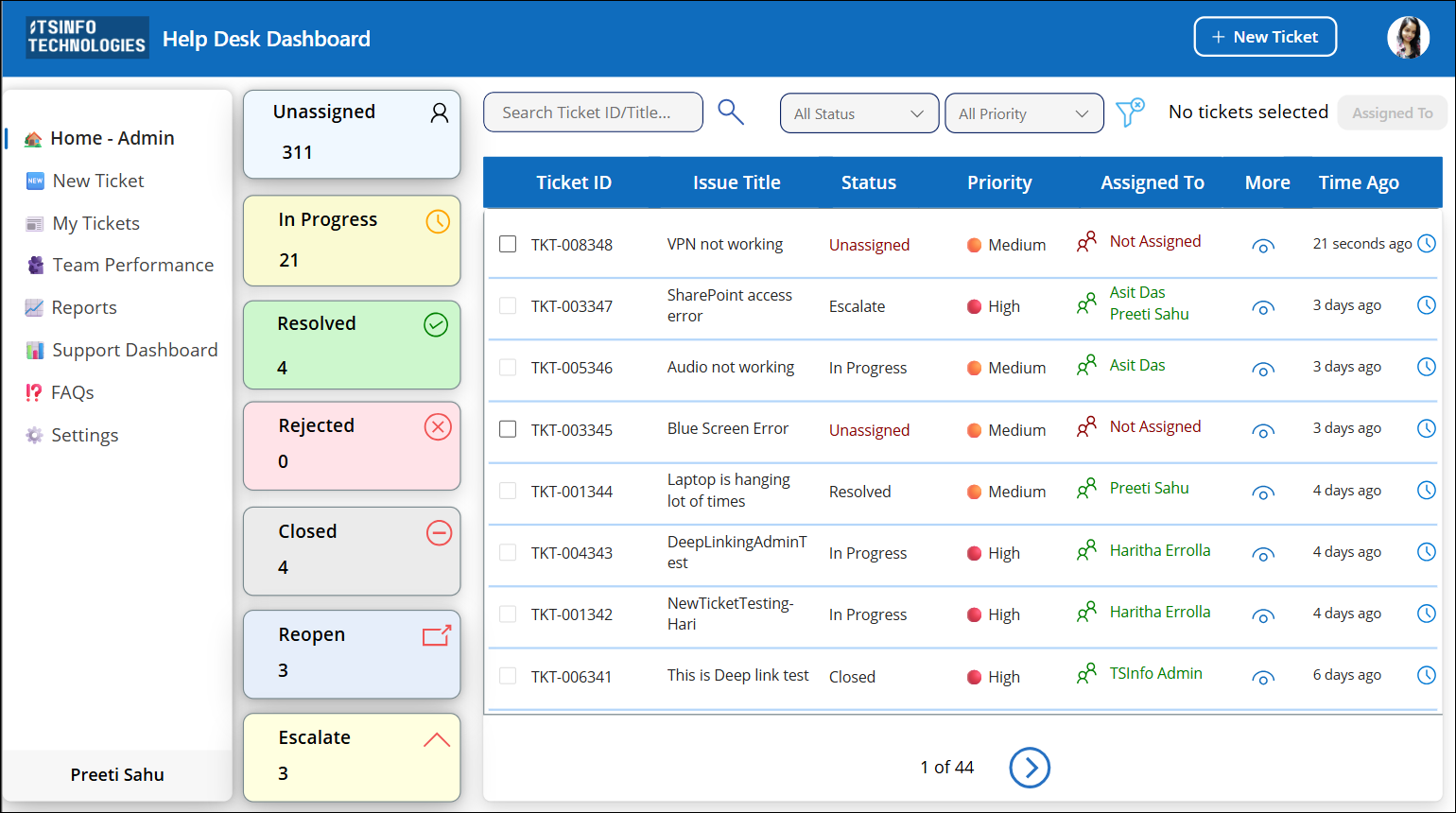
Admin Home Screen
View, filter, and assign all tickets from a single command center — with KPI cards, bulk actions, and smart search.
User Home Screen
A personalized dashboard showing ticket status, resolution stats, support contacts, and a quick raise-ticket button.
New Ticket Screen
A modern, validated form with auto-generated IDs, phone formatting, On Behalf Of support, and dynamic categories.
My Tickets Screen
Three organized tables — tickets for me, by me, and by others — all searchable, filterable, and paginated.
Support Dashboard
Agents manage their full workload: view, update, assign, or close tickets — filtered by date range.
Support Agent Form
Add comments, assign ownership, and set a mandatory due date — all in one focused action form.
Team Performance Screen
Track every agent's ticket output — total, resolved, in progress — filtered by Today to Last 30 Days.
Reports Screen
Visual analytics dashboard with pie charts, column charts, and KPI tiles across any time window.
FAQs & Settings
Searchable FAQ library for self-service, plus full admin control over users, categories, branding, and support info.
100% Microsoft... Zero External Dependencies.
Every component is built on technology your organization already owns, trusts, and knows how to govern.
“No third-party databases. No external APIs. No additional SaaS subscriptions. If your organization runs Microsoft 365, you already have everything this app needs.”
Microsoft Power Apps
Canvas app front end — all screens, forms, and role-based navigation built here.
Microsoft Power Automate
Workflow automation — ticket notifications, assignments, and escalation flows.
Microsoft SharePoint
Backend database — all ticket data, categories, FAQs, and settings stored as SharePoint lists.
Microsoft 365 / Azure AD
User identity and directory — authentication, role assignment, and active user lookup.
See It Before You Deploy It.
Real screenshots from IT Help Desk Pro — no mockups, no marketing fluff. Just the actual app your team will use every day.


Your IT Help Desk Is Ready to Deploy.
Stop managing support with email and spreadsheets. Get a structured, automated, role-based IT ticketing system — built entirely inside Microsoft 365.
FREQUENTLY ASKED QUESTIONS
Got Questions? We’ve Got Answers.
Q1: Do I need any additional Microsoft licenses to use this app?
A: No. IT Help Desk Pro runs entirely on Power Apps, Power Automate, and SharePoint — all included in standard Microsoft 365 business and enterprise plans. No additional licensing is required.
Q2: Where is the ticket data stored?
A: All data is stored in SharePoint Lists inside your own Microsoft 365 tenant. Nothing is sent to external servers or third-party databases. Your data stays fully within your organization’s governance and compliance policies.
Q3: How long does it take to deploy?
A: Most organizations are up and running within a few hours. The Settings screen lets you configure your company name, logo, ticket ID prefix, support hours, and team members — all without touching any code.
Q4: Can we customize the app after purchase?
A: Yes. The app is a standard Power Apps canvas app. Any licensed Power Apps developer in your organization can open, modify, and extend it to fit your specific workflows and requirements. You can even contact us.
Q5: How are user roles managed?
A: Roles (Admin, Supporter, User) are managed directly inside the app’s Settings screen. Admins can add new users, assign roles, and activate or deactivate team members at any time.
Q6: Can users raise tickets on behalf of others?
A: Yes. The New Ticket Screen includes an “On Behalf Of” toggle. When enabled, the user can search and select any active Microsoft 365 user as the ticket requester. Guest and external accounts are automatically excluded.
Q7: Can we add our own ticket categories?
A: Yes. The Ticket Categories tab inside Settings lets Admins create, edit, and manage categories at any time. New categories appear automatically in the New Ticket form dropdown.